NapBuster app icon

NAPBUSTER

Your watch won't let you nap.

Daytime dozing steals your night. NapBuster reads your heart rate, spots a nap forming in minutes, and buzzes it away — entirely on your Pebble.

v1.8.0 MIT license Pebble Time 2 · Pebble 2 · Time · Round no phone app needed
View on GitHub Build & install ↓
the doom loop
nap at 15:30 → wide awake at 01:00 → exhausted → nap at 15:30

How it works

A background worker guards your configured no-nap hours with two-tier detection. Heart rate is the primary signal — as you drift off, your HR sinks below your awake baseline. Motion (VMC) is the gate that rules out false alarms while you're up and about.

0 min eyes close ~4–5 min quiet nudge ~10 min full alarm
TIER 1 · STEP 1

WATCH THE HEART

While guarding, NapBuster samples your heart rate every 60 seconds. When the smoothed value drops 8–20% (your choice) below your anchored awake baseline and you're very still, a streak starts counting.

TIER 1 · STEP 2

NUDGE FIRST

After ~4 minutes of sustained evidence: a quiet double pulse. If you were just relaxing, you'll barely notice. If you were drifting off, it's enough to break the slide.

TIER 1 · STEP 3

THEN THE ALARM

Still sinking at ~10 minutes? The full repeating alarm fires and keeps buzzing until you dismiss it — or snooze for 10/30 min if you've earned it.

Anchored awake baseline

Your reference HR never chases you into a nap: it moves up freely (unless you're exercising) but only moves down when movement proves you're awake. A rolling average can't do that.

Tier 2 safety net

On every Pebble — including watches without a heart-rate sensor — the OS's own sleep classification is a fallback trigger. Slower (45–90 min), but it catches what Tier 1 can't.

Honest battery math

Outside your no-nap window, NapBuster piggybacks on samples the OS takes anyway — zero extra cost. Inside the window it requests 60-second HR sampling; that's the one real spend, and it stops the moment the window closes. (Tunable via HR_BOOST_PERIOD_SECS.)

On the wrist

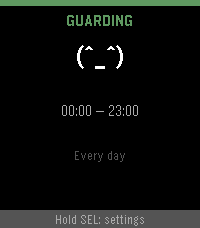
NapBuster GUARDING screen: green happy ASCII face, schedule 00:00 to 23:00, every day
GUARDING — window open, HR watched
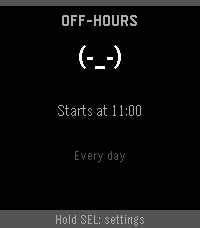
NapBuster OFF-HOURS screen: neutral ASCII face, guard starts at 11:00
OFF-HOURS — nap freely, it starts later
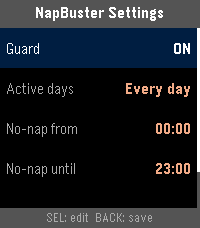
NapBuster settings screen: guard toggle, active days, no-nap window hours
SETTINGS — hours, days, vibe, sensitivity
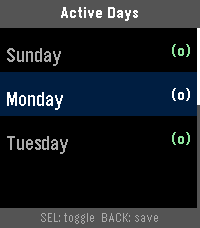
NapBuster active days picker with Sunday, Monday, Tuesday toggled on
ACTIVE DAYS — weekdays only? sure
live telemetry while guarding:  HR:68 base:74 vmc:42 x1 0m

Features

🔬 Minute-level detection

Owned 60 s HR cadence inside the guard window — not the OS's lazy 10-minute default.

🔔 Two-stage wake

Gentle nudge first; the full alarm only if you keep sinking. Both time-based, not sample-count roulette.

💤 Snooze that survives

10 or 30 minutes via the Wakeup API — works even if the app closes.

📅 Per-day schedule

Guard weekdays, weekends, or any custom set of days and hours.

💪 Three vibe strengths

Gentle, Medium, Strong — pulse-density patterns, test-buzzed as you pick.

🎛️ Tunable sensitivity

Sensitive / Balanced / Conservative HR-drop thresholds to match your physiology.

📊 Live telemetry

HR, baseline, motion, streak and analysis age right on the watch face — see it working.

🛡️ Fallback tier

OS sleep classification backs up the HR engine on all supported watches.

Supported watches

PlatformWatchDetection
emeryPebble Time 2 (primary target)Tier 1 (HR + motion) + Tier 2
dioritePebble 2 HRTier 1 (HR + motion) + Tier 2
basaltPebble Time / Time SteelTier 2 only (no HR sensor)
chalkPebble Time RoundTier 2 only (no HR sensor)

Requires Pebble Health enabled in the rePebble mobile app (Devices → Health).

Build & install

# one-time: pebble-tool needs Python 3.11
uv venv ~/.pebble-venv --python 3.11
~/.pebble-venv/bin/pip install pebble-tool
~/.pebble-venv/bin/pebble sdk install latest

# build
git clone https://github.com/JoLeungGitHub/nap-buster.git
cd nap-buster
~/.pebble-venv/bin/pebble build          # → build/napbuster.pbw

# install to your watch (enable Dev Connect in the rePebble app first)
~/.pebble-venv/bin/pebble login
~/.pebble-venv/bin/pebble install --cloudpebble

Full SDK setup instructions at developer.repebble.com/sdk.